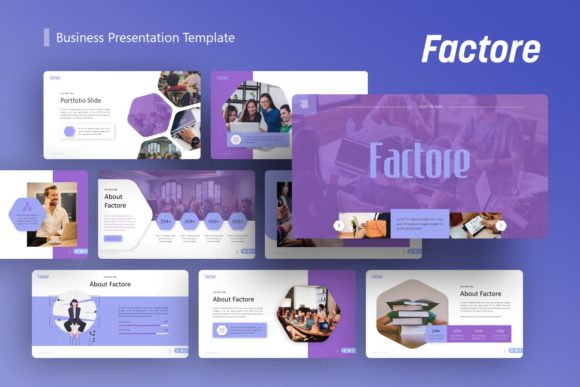
Factore Business Presentation Template Guide
Creating a pitch deck or corporate profile often feels like a battle between content and design. You have the data and the narrative, but translating that into a visual format that holds attention is a different challenge entirely. The Factore Business Presentation Template addresses this specific friction point by offering a structured yet flexible framework that prioritizes clarity without sacrificing aesthetic appeal. Unlike generic templates that force your content into rigid boxes, Factore operates as a comprehensive design system built on master slides, allowing for rapid iteration while maintaining professional consistency.
Visually, Factore leans into modern typography and clean spatial arrangements. It avoids the cluttered, over-designed look that plagues many legacy business templates. Instead, it utilizes strong visual hierarchy and pixel-perfect illustrations to guide the viewer’s eye through complex information. The personality of the template strikes a balance between corporate reliability and creative agency flair. It is assertive enough for a startup pitch deck yet refined enough for a high-end photography portfolio. This versatility stems from its underlying grid system and thoughtful use of negative space, which allows both text-heavy slides and image-dominant layouts to breathe effectively.
Versatile Applications Across Industries
The true value of a premium presentation asset lies in its adaptability. While marketed broadly, Factore excels in specific contexts where professional polish directly influences audience perception. For creative agencies and design studios, the template serves as an extension of brand identity. The handcrafted infographics and resizable vector elements allow designers to showcase their work within a container that doesn't compete with the portfolio pieces themselves. When presenting to potential clients, the template’s editorial design sensibilities signal that the agency understands layout, composition, and visual storytelling.
In the corporate and business sector, readability and data visualization are paramount. Factore supports these needs through its 36 unique slide variations. Whether you are presenting quarterly earnings, a company profile, or an internal strategy update, the template provides pre-configured layouts for charts, timelines, and team introductions. These aren't just static images; they are fully editable PowerPoint objects. This means a marketing manager can update sales figures or swap out headshots without needing advanced graphic design skills or external software. The consistency provided by the master slide structure ensures that even if multiple team members contribute to the deck, the final output remains cohesive and professionally branded.
For entrepreneurs and startups, the pitch deck is often the first tangible impression investors receive. Factore facilitates this critical communication by offering layouts specifically designed for problem-solution narratives, market sizing, and business models. The clean sans serif font pairings included in the template enhance legibility on projection screens and laptop displays alike, ensuring that key metrics are never lost to poor contrast or decorative excess. Similarly, personal portfolios benefit from this structured approach. Freelancers and consultants can use the template to create a digital resume or service brochure that looks bespoke rather than templated, helping to establish credibility in competitive markets.
Enhancing Communication Through Visual Hierarchy
Typography and layout choices in a presentation template do more than make slides look attractive; they fundamentally alter how information is processed. Factore employs modern typography principles to establish clear entry points for the viewer. Headings are distinct from body copy not just in size, but in weight and spacing, creating a rhythm that makes scanning easier. In a business context, where stakeholders often skim before reading deeply, this visual hierarchy is a functional necessity. It directs attention to the most critical insights first, supporting the speaker’s narrative rather than distracting from it.
The inclusion of handcrafted infographics transforms abstract data into digestible visuals. Rather than relying on standard Excel charts pasted onto a slide, Factore provides integrated graphic elements that align with the overall design language. This consistency reinforces brand perception. When colors, line weights, and icon styles remain uniform throughout a 30-slide deck, it subconsciously communicates organizational competence and attention to detail. For photographers and visual artists, the picture placeholders utilize smart cropping and alignment tools that maintain aspect ratios and focal points, ensuring that creative work is displayed respectfully and effectively.
Consistency also plays a vital role in audience engagement. A disjointed presentation where fonts shift, margins wander, and color palettes clash creates cognitive load that detracts from the message. By utilizing a master slide-based system, Factore automates these foundational elements. This allows the presenter to focus entirely on content refinement and delivery. The psychological impact of a polished, consistent deck cannot be overstated; it builds trust and reduces skepticism, making the audience more receptive to the proposed ideas or services.
Practical Implementation and Customization Strategy
Maximizing the utility of the Factore Business Presentation Template requires a strategic approach to customization. Before opening the .PPTX file, review the included documentation. Understanding the master slide structure upfront saves hours of reformatting later. Identify which of the 36 slides best map to your content outline. Resist the urge to use every variation; select only those that serve your narrative arc. A tighter, more focused deck using ten perfectly tailored slides is invariably superior to a sprawling thirty-slide marathon that dilutes the core message.
When customizing, pay close attention to font pairing and licensing. While Factore includes robust typographic choices, you may need to adjust these to match existing brand guidelines. Test your chosen pairings at actual presentation size. What reads well on a 27-inch monitor during editing may become illegible when projected in a conference room or viewed on a mobile device via email. Ensure sufficient contrast between text and background colors. If replacing the default imagery, use high-resolution assets that match the template’s lighting and tonal qualities to maintain visual harmony. Remember that all demo images are for preview purposes only, so sourcing appropriate commercial-use photography is a necessary step in the production process.
Evaluate the editability of the vector icons and illustrations early in your workflow. Because these elements are fully resizable and editable within PowerPoint, you can modify colors and shapes to align precisely with your brand palette. However, avoid over-customizing. The strength of Factore lies in its balanced proportions and professional restraint. Drastic alterations to spacing or element sizing can disrupt the intended visual flow. Treat the template as a collaborative partner in your design process. Use its structure to elevate your content, but respect the design decisions that make it effective.
Finally, consider the technical delivery format. If sharing digitally, export as PDF to preserve formatting across different devices and operating systems. If presenting live, test the file on the actual hardware you will be using to catch any compatibility issues with embedded fonts or media. The drag-and-drop functionality for picture placeholders streamlines updates, but always verify that replaced images haven't distorted or shifted alignment. By approaching the Factore Business Presentation Template with intentionality and respect for its underlying design logic, you transform a collection of slides into a powerful communication tool that resonates with diverse audiences and achieves tangible business objectives.