Evaluating Presentation Template - Segment for Professional Use
Selecting the right visual framework is a critical step in preparing for high-stakes communication. For professionals researching design assets, the Presentation Template - Segment offers a structured solution aimed at streamlining the creation of pitch decks, corporate profiles, and portfolios. This template is designed to serve a broad spectrum of users, from creative agencies and startups to individual photographers and business consultants. Understanding its specific features, technical requirements, and practical limitations is essential for determining whether it aligns with your current project goals and workflow.
Core Functionality and Design Scope
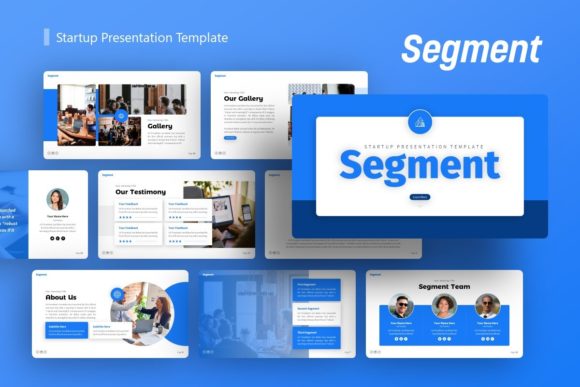
The Presentation Template - Segment is primarily a PowerPoint-based asset (.PPTX) that provides a comprehensive library of pre-designed slides. It includes 36 unique slide layouts per template variation, offering substantial depth for long-form presentations. The design philosophy centers on modularity and ease of editing, utilizing Master Slides to ensure global consistency across the deck. This architecture allows users to change fonts, colors, and logos in one location and have those updates propagate throughout the entire presentation, significantly reducing manual formatting time.
A distinguishing feature of this asset is the inclusion of handcrafted infographics built directly within PowerPoint. Unlike static images imported from external design software, these graphics are composed of native shapes and text boxes. This means data visualization elements remain fully editable without requiring Adobe Illustrator or similar vector tools. Users can resize, recolor, and adjust infographic components to match their specific data sets while maintaining pixel-perfect alignment. Additionally, the template incorporates picture placeholders with drag-and-drop functionality, simplifying the process of swapping demo imagery for actual content.
Strategic Fit for Different User Personas
Evaluating the utility of the Presentation Template - Segment requires mapping its features to specific user needs. The versatility of the 36-slide structure makes it particularly relevant for several distinct professional scenarios:
- Startups and Pitch Decks: Entrepreneurs often need to convey complex business models quickly. The template’s infographic capabilities and structured layouts support standard pitch narratives, including problem-solution slides, market analysis, and financial projections. The ability to edit vectors natively allows founders to update metrics rapidly between investor meetings.
- Creative Agencies and Portfolios: Visual-heavy users benefit from the clean, modern aesthetic and image placeholders. For agencies presenting case studies or photographers showcasing work, the layout prioritizes visual hierarchy over dense text, allowing high-quality imagery to take precedence.
- Corporate and Business Reporting: Internal stakeholders often require standardized reporting formats. The Master Slide foundation ensures that departmental presentations adhere to brand guidelines without constant oversight from design teams. The included documentation file assists non-designers in navigating the template correctly.
- Personal Branding: Freelancers and consultants using this for personal portfolios will find the balance between professional structure and creative flexibility useful for distinguishing themselves in competitive markets.
Benefits and Operational Advantages
The primary value proposition of adopting the Presentation Template - Segment lies in efficiency and accessibility. By leveraging pre-built master slides and native PowerPoint elements, users avoid the steep learning curve associated with professional design software. The "all graphic resizable and editable" specification ensures that the template remains functional across different screen aspect ratios and print formats without distortion.
Furthermore, the inclusion of vector icons and comprehensive documentation reduces dependency on external assets. Users do not need to source separate icon packs or guess how to manipulate complex layouts. This self-contained nature makes it a practical choice for teams with varying levels of design literacy, as the technical barrier to entry is lowered while maintaining a polished output standard.
Tradeoffs and Critical Considerations
While the template offers significant advantages, objective evaluation requires acknowledging potential limitations. Prospective users should consider the following tradeoffs before acquisition:
Software Dependency
This asset is strictly a PowerPoint .PPTX file. Organizations or individuals who have standardized on Keynote, Google Slides, or Canva may encounter compatibility issues. While conversion is possible, complex master slides and native infographics often lose editability or formatting fidelity when moved between platforms. If your ecosystem is not Microsoft-centric, this template may introduce friction rather than efficiency.
Asset Exclusions
It is vital to note that all images shown in the preview demo are for display purposes only and are not included in the downloadable files. Users must have access to their own high-quality photography or stock image subscriptions. The visual impact of the final presentation relies heavily on the quality of user-supplied assets; poor-quality images will detract from the professional template design.
Customization Ceiling
Although the graphics are editable within PowerPoint, they are still bound by the constraints of the application. Users seeking highly bespoke, avant-garde typography or complex masking effects may find PowerPoint’s native toolset limiting compared to dedicated vector software. The template excels at business communication but may not satisfy niche artistic requirements that demand advanced graphic design techniques.
Decision-Making Framework
Determining whether the Presentation Template - Segment is the correct investment involves assessing three key factors: workflow compatibility, content volume, and resource availability.
Workflow Compatibility: Confirm that your team creates and delivers presentations primarily via PowerPoint. If collaboration occurs in cloud-native environments like Google Workspace, test a sample .PPTX file first to verify that master slides and infographics translate correctly. Do not assume seamless interoperability.
Content Volume: Evaluate if 36 slides provide sufficient variety for your typical deck length. If your presentations routinely exceed 50 slides or require highly specialized industry-specific diagrams not covered by general business infographics, you may need to supplement this template with custom design work. Conversely, if you typically present 10-15 slides, assess whether the extensive library adds value or merely adds browsing overhead.
Resource Availability: Audit your existing image and icon libraries. Since demo images are excluded, calculate the time and cost required to source replacement visuals. If you lack a ready supply of professional photography, the total cost of ownership increases beyond the template price alone.
When to Consider Alternatives
The Presentation Template - Segment is a strong contender for generalist business and creative communication, but alternatives may be superior in specific contexts. If your primary need is data-heavy financial modeling with real-time Excel linking, a specialized financial presentation tool may offer better integration. For marketing teams requiring strict brand governance across hundreds of users, enterprise-level brand management platforms provide safeguards that a standalone .PPTX file cannot enforce.
Additionally, users focused exclusively on web-based delivery might prefer HTML5 or interactive presentation frameworks that offer animation and responsiveness beyond PowerPoint’s capabilities. Finally, if your design requirements are minimal and speed is the sole priority, simpler templates with fewer master slides may reduce setup time for basic communications.
Final Evaluation Summary
The Presentation Template - Segment represents a balanced option for professionals seeking a versatile, editable, and comprehensive PowerPoint foundation. Its strength lies in the combination of handcrafted native infographics, master slide efficiency, and broad applicability across startup, agency, and corporate use cases. However, its utility is contingent upon a Microsoft PowerPoint workflow and the user's ability to supply high-quality visual assets. By weighing these operational realities against your specific presentation needs, you can make an informed decision that supports both immediate project success and long-term communication efficiency.