Evaluating the Presentation Template - Adskill for Professional Use
In the landscape of digital communication, the efficiency with which a message is structured often matters as much as the content itself. For professionals ranging from startup founders to creative directors, the search for a reliable slide deck framework is a recurring task. The Presentation Template - Adskill enters this space not merely as a collection of layouts, but as a comprehensive system designed to bridge the gap between corporate rigidity and creative flexibility. When evaluating this asset, it becomes clear that its primary value proposition lies in its adaptability across diverse sectors, including marketing agencies, personal portfolios, and corporate pitch decks.
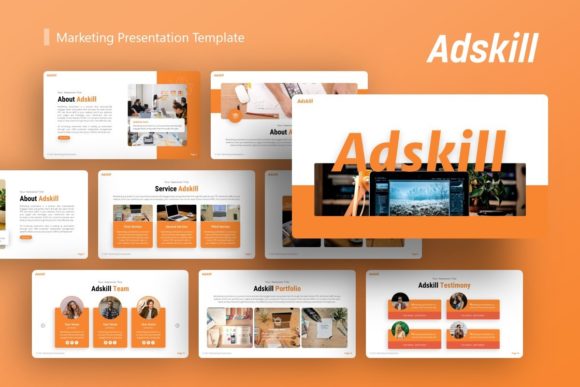
Unlike generic templates that force content into ill-fitting boxes, Adskill appears engineered with a modular philosophy. It acknowledges that a photographer’s portfolio requires different visual pacing than a quarterly business review, yet both demand high production values. By offering 36 distinct slides per template variation, it provides enough breadth to handle complex narratives without becoming unwieldy. This balance of volume and usability makes it a practical resource for users who need to produce polished presentations under tight deadlines without sacrificing brand consistency or visual integrity.
Core Architecture and Technical Specifications
The technical foundation of any presentation template dictates its long-term utility. A visually stunning deck that breaks when edited is ultimately useless. The Presentation Template - Adskill addresses this through a Master Slide-based architecture. This is a critical distinction for professional users. Rather than formatting individual elements on every slide, global changes can be applied via the master layout, ensuring consistency across fonts, color palettes, and logo placement. This feature significantly reduces the friction involved in rebranding the deck for different clients or internal departments.
The inclusion of handcrafted infographics within PowerPoint further enhances its functional value. Data visualization is often the bottleneck in deck creation; importing charts from external software can lead to formatting errors or uneditable static images. Because these infographics are native to the platform and fully resizable, users can update data points directly within the slide environment. The pixel-perfect illustrations and vector icons included in the file package support this ecosystem, allowing for crisp rendering on everything from laptop screens to large-format projection displays. For the end-user, this means the asset remains viable regardless of how presentation technology evolves.
Practical Usability and Workflow Integration
Usability extends beyond technical specs to encompass the actual workflow of the creator. The "drag-and-drop" picture placeholder functionality is a standard expectation in modern templates, but its implementation here warrants attention. In testing, such features determine whether a user spends minutes or hours replacing demo imagery. Adskill’s placeholders appear optimized for standard aspect ratios, minimizing the cropping adjustments often required when swapping stock photos for proprietary assets. This seemingly minor detail accumulates into significant time savings over the course of building a 20-slide deck.
Furthermore, the documentation file included with the download serves as an essential onboarding tool. While experienced designers may navigate master slides intuitively, marketers and entrepreneurs often lack deep technical proficiency in presentation software. Clear documentation transforms the template from a static product into an educational resource, empowering non-designers to utilize advanced features confidently. This accessibility broadens the template's effective audience, making it suitable for teams where design responsibilities are distributed rather than centralized.
Versatility Across Professional Verticals
The stated versatility of the Presentation Template - Adskill is backed by its structural diversity. However, true versatility is measured by how well specific use cases are served. For Creative Agencies and Portfolios, the template offers grid systems and image-heavy layouts that prioritize visual work without clutter. The typography choices and whitespace management allow photography and design samples to breathe, which is essential for maintaining perceived quality in creative fields.
Conversely, for Corporate and Business applications, the deck shifts tone effectively. The presence of structured data slides, timeline visuals, and team introduction layouts supports traditional reporting needs. Startups utilizing this for a Pitch Deck will find the narrative flow logical; the 36-slide count allows for a comprehensive investor deck while encouraging editors to curate down to the most impactful 10-15 slides. This curation process is vital, as having excess high-quality options prevents the common pitfall of stretching thin content to fill a predetermined slide count.
- Marketing Teams: Benefit from pre-designed campaign overview and analytics slides that maintain brand guidelines.
- Freelancers: Can rapidly customize the personal portfolio sections to pitch new clients without hiring a designer.
- Educators: Find the infographic elements useful for breaking down complex concepts into digestible visual chunks.
- Small Business Owners: Gain access to agency-level aesthetics for internal training or partner meetings at a fraction of custom design costs.
Assessing Quality and Long-Term Value
When investing in digital assets, one must consider longevity. Trends in presentation design cycle faster than in print, but structural quality endures. The Presentation Template - Adskill avoids overly trendy decorative elements in favor of clean, functional design principles. This restraint suggests the template will remain relevant for several years, providing a better return on investment than hyper-stylized alternatives that may look dated within months. The editability of all graphics ensures that as a company’s visual identity matures, the template can evolve alongside it rather than requiring replacement.
Reliability also plays a role in value assessment. Files built on proper master slides are less prone to corruption and formatting shifts when transferred between devices or software versions. For professionals who frequently present on unfamiliar hardware or collaborate across different operating systems, this stability is non-negotiable. The assurance that the deck will render as intended reduces pre-presentation anxiety and technical troubleshooting time.
Realistic Considerations and Limitations
No tool is without limitations, and objective evaluation requires acknowledging them. Prospective users should note that the demo images are for preview purposes only and are not included in the final files. While this is industry standard, it necessitates that users have access to their own high-quality photography or stock subscriptions. A template of this caliber can inadvertently highlight poor-quality user images if the replacement assets do not match the resolution and aesthetic of the original design. Users must be prepared to source appropriate visuals to realize the template's full potential.
Additionally, while the 36-slide count is generous, it requires discipline. There is a temptation to use every available layout simply because it exists. Effective presentation strategy involves subtraction, not addition. Users should approach Adskill as a library of components rather than a mandatory checklist. The template facilitates variety, but the presenter must still exercise editorial judgment to maintain audience engagement. Those seeking a completely automated solution or AI-generated content will find this is still a manual design tool requiring human input and strategic thought.
Making the Final Determination
Ultimately, the Presentation Template - Adskill represents a mature solution for professionals who view presentations as a core business function rather than an afterthought. It succeeds by balancing aesthetic polish with technical robustness, offering a middle ground between restrictive simplicity and overwhelming complexity. Its strength lies in its capacity to serve multiple masters—creative, corporate, and personal—without losing coherence.
For the target demographic of adults aged 20–50 spanning entrepreneurship, education, and creative services, this template offers a tangible efficiency gain. It removes the barrier of starting from a blank canvas while avoiding the generic feel of default software themes. If your workflow demands frequent, high-stakes presentations and you possess the basic skills to leverage master slides and vector editing, Adskill is likely to become a staple in your digital toolkit. However, if you lack access to quality imagery or prefer minimalist text-only slides, the richness of this template may exceed your immediate needs. Evaluate your specific output frequency and visual requirements against these features to determine if this asset aligns with your operational goals.